Agentic Commerce
Operator Handbook
You represent the Agentic Commerce service in the field. This document is your complete reference — what the system is, how to find the right merchants, how to run a successful install, and when to escalate to the deployment team. Read it once fully before your first conversation.
Orientation:
What You've Joined
Before you speak to a single merchant, you need a clear mental model of what Agentic Commerce is and isn't. This chapter gives you that model — the system, the protocols, the agents, the tiers, the numbers, and your role in all of it.
What Agentic Commerce Actually Is
When a person says "I want my favourite coffee" to their AI, the agent doesn't open a search engine. It looks for stores with agent-readable infrastructure — a discovery file, a structured product catalog, a purchase endpoint. If it finds one, it reads the products, selects the right one, and completes the full purchase. The transaction closes without the customer touching a browser, a search bar, or a checkout page.
The stores that have that infrastructure get the sale. The stores that don't are invisible to this traffic channel entirely. The agent doesn't partially engage — it either completes the purchase with you, or it completes it somewhere else.

An AI agent finds your store, picks the right product, and completes the purchase — without a human touching anything. That is the outcome you are helping merchants achieve.
This is not a chatbot. A chatbot is reactive — it waits for a question and responds. An agent is proactive — it monitors signals, makes decisions, and takes actions. In commerce, the agent has been given authority to act on a customer's behalf. It doesn't need to be asked. It just buys.
The Five-Protocol Stack
To be agent-ready, a merchant's store must implement five protocols. Each one makes the store accessible to a different class of agent. Together they form the complete stack — the only complete five-protocol implementation available commercially:
| Protocol | What it enables | Developed by |
|---|---|---|
| ACP | Agentic Commerce Protocol — the discovery and purchase standard. ChatGPT Operator, Perplexity, and ACP-compatible agents can find the store and complete a transaction. | OpenAI + Stripe |
| AP2 | Agent Payments Protocol — Google's forthcoming agent payment standard. Store is ready for Google's agent stack when it goes live. | |
| UCP MCP | Model Context Protocol — exposes the store's capabilities directly to Claude and other MCP-compatible AI models as structured tool calls. | Anthropic |
| A2A | Agent-to-Agent Protocol — enables multi-agent coordination for complex commerce transactions where multiple agents collaborate. | |
| ABT-C v2 | Agent Behavioral Trust · Commerce — the trust and audit layer that tracks and certifies every AI agent interaction: what the agent read, what it was authorised to buy, and how the transaction was verified. Full cryptographic audit trail in the merchant's dashboard. | sidratnam.com — provisional patent filed |
When ABT-C comes up: say "Only available through sidratnam.com — provisional patent filed." Never say "exclusive," "patented," or anything that implies a legal monopoly. The claim is operational and accurate: no other operator offers this layer. Keep it factual.
ABT-C — The Consumer Privacy Layer
ABT-C (Agentic Boundary Tokenization · Commerce) is the fifth protocol in the stack — and the only one built by sidratnam.com. It is not a marketing feature. It is a cryptographic architecture that changes where consumer personal data lives during an AI agent transaction. Every other protocol governs how agents discover and transact with merchants. ABT-C governs what happens to the customer's personal information inside that transaction.
US Provisional Patent Application No. 64/056,353 — only available through sidratnam.com. Say this to merchants exactly as written. Never say "exclusive" or "patented." Say: "Provisional patent filed — only available through sidratnam.com."
"Credit card companies already solved this for payment data — encryption, tokenization, a cryptographic audit trail. Every transaction locked, logged, verified. ABT-C does the same thing for your customers' personal shopping data. Nothing like this has existed for AI agent commerce before."
How it works
The customer's personal data — name, address, order history, preferences — is encrypted at their device before it ever leaves. The merchant receives ciphertext and a callback URL. The merchant's server never holds the plaintext. To process a transaction, the merchant requests a per-transaction decryption key from the customer's device through an authenticated callback. The device releases the key — not the plaintext — during the agreed retention window. When the window closes, the key is destroyed. The plaintext cannot be recovered by anyone.
Every interaction is signed and added to a hash-chained registry — what the agent read, what it was authorised to buy, what it completed. Tamper-evident. Permanently auditable. The merchant sees this in their dashboard. So does the customer.
Why merchants need this — three angles
- Liability protection. If the merchant's server is breached, there is no personal data to steal. The ciphertext is worthless without the customer's device key. This is not a contractual promise — it is architectural. You cannot breach what isn't there.
- Consumer trust. Customers are increasingly aware that their personal data is being collected, stored, and sold by every platform they touch. ABT-C gives merchants something real to point to: their customers' data is encrypted at the customer's device, and no one — not the merchant, not the platform, not Sid Ratnam — can access it without the customer's device unlocking it. That is a differentiation most merchants cannot offer.
- Regulatory compliance — now and ahead. GDPR Article 5 mandates data minimization and storage limitation. CCPA requires consumer control over personal data. ABT-C enforces both architecturally — not just contractually. A merchant running ABT-C is not relying on a privacy policy to stay compliant. The structure of the system enforces compliance by design.
Sid is actively working to position ABT-C as the legal standard for AI agent commerce. The argument is straightforward: AI agents will transact on behalf of hundreds of millions of consumers. Without a cryptographic trust layer, every AI-assisted purchase is a potential privacy violation at scale. Consumer protection law will catch up — it always does.
The merchants who install ABT-C today will be mandated-compliant before their competitors even understand what a mandate is. This is the same dynamic as early SSL adoption, early PCI-DSS compliance, early GDPR readiness. The businesses that moved early set the standard. The ones that waited scrambled.
When you're talking to a merchant who is concerned about privacy regulations or who has been burned by data breaches: "This is what getting ahead of it looks like. The regulation is coming. You're already compliant."
How ABT-C fits into the transaction
ABT-C is conditional — it activates when the consumer's device signals capability. Standard ACP and UCP MCP flows route to regular checkout by default. When both sides signal ABT capability, the same merchant endpoints route to the ABT-C path: consumer-side key generation, per-tier encryption, registry witness. No ABT overhead on non-ABT transactions. No breaking changes.
The merchant's dashboard shows a full audit log: every agent interaction hash-chained and signed, every key release timestamped, every retention window recorded. The merchant can prove to any auditor, regulator, or customer exactly what happened with their data at every step.
Full protocol documentation: sidratnam.com/abt/ · ABT-C Commerce specification: sidratnam.com/abt-c/
The Four Agents (JARVIS Suite)
The JARVIS Suite deploys four specialised agents. Each agent owns one stage of the commerce journey. This is the complete vision — the Foundation tier installs one agent (Discovery Optimizer). JARVIS Suite installs all four plus JARVIS.
Foundation & JARVIS: Two Separate Technologies
These are not competing options — they are two distinct technologies that serve different purposes. Foundation is the required first install. JARVIS is a separate AI automation layer a merchant adds on top once Foundation is live. A merchant can have Foundation without JARVIS. No merchant can have JARVIS without Foundation.
Know what each does precisely. The most common operator error is treating them as tiers of the same product. They are not — they solve different problems.
Foundation makes the store agent-ready. JARVIS runs the store's marketing, SEO, and content autonomously — without a human doing those jobs daily.
- Discovery Optimizer agent — installed on the merchant's own VPS
- 50-point catalog test on install day (the agent proves it understands the catalog before you invoice)
- AC dashboard — live view of human vs agent orders from the merchant's own database
- ACP substrate: discovery endpoint, purchase endpoint, kill switch
- 30-day delivery + 30-day support window
- No invoice until after the live test succeeds
- All four agents: Discovery Optimizer, Cart Recovery, Checkout Intelligence, Post-Purchase
- JARVIS — a separate AI system that runs SEO, content, internal linking, and GSC audits daily without a human doing it
- Targets merchants who want to compete on rankings and marketing without hiring for those roles
- Three live training sessions (install, day 30, day 60 graduation) — training covers how to direct JARVIS for their specific needs so the merchant becomes their own support
- 60-day delivery + 90-day support window
- Merchant owns the full codebase and runs independently after graduation

Foundation + JARVIS Suite combined at maximum savings ($5K less than buying separately). Single engagement, unified delivery. $25,000 is Both Together. NOT the JARVIS Suite price. This is the most common copy error — say "Both Together" when quoting $25K.
The Real Numbers
Use these stats with exact attribution. Never paraphrase loosely or strip the source. The numbers are strong enough — they don't need inflating.
You can say: "If 20% of orders are starting to route through agents and your store isn't agent-ready, that's 20% going to merchants who are." This framing is grounded in the Salesforce figure. Always label it as illustrative — it's a logical consequence of the data, not a measured loss figure for any specific merchant. Don't present it as a guarantee.
Your Role
You are a trusted deployer and local relationship. Your job is to find the right merchants, open the right conversation, direct them to apply, and support the install day. You are not building the system — the deployment team and infrastructure do that.
You represent Sid's brand directly. Every merchant you speak to is forming an impression of sidratnam.com. That impression is built on the same three standards that govern everything Sid does:
Possible. It actually gets built. It actually works. No vaporware.
Honest. No bullshit, no shortcuts, no hidden costs. The price is the price.
Right. It serves the people it's supposed to serve. The mechanism is transparent.
Your value is the relationship — you know the merchant, you know the local market, you can have conversations that don't scale from a central team. Bring the right people in. Let the system close for itself.
Brand Standards: What to Say, What Never to Promise
✓ "AI agents can find your store and complete the full purchase automatically."
✓ "Only available through sidratnam.com — provisional patent filed."
✓ "72 hours to pay if you want to keep it running."
✓ "You own the code. It runs on your VPS. No SaaS license."
✓ "Shopify's built-in discovery surfaces you — it doesn't complete the purchase for an AI agent."
✓ "One-time cost. No ongoing fee to maintain the capability."
✗ "Patented" — say "provisional patent filed"
✗ "Exclusive" — say "only available through sidratnam.com"
✗ "The system removes itself" — say "the 72-hour window closes"
✗ "Stripe charge" or "real transaction" for the install test — it's POS in test mode
✗ Any specific timeline the deployment team hasn't confirmed
✗ Any feature the deployment team hasn't confirmed
✗ Any promise about legal protection or monopoly on ABT-C
The Sale
The sale happens through observation and honest framing — not pressure. You find a merchant who fits, open the right conversation, and direct them to apply. Our team reviews the application and makes the call on fit. Your job ends at the application.
Ideal Merchant Profile
Foundation is the base layer for any merchant who sells anything. It doesn't require a specific business model, industry, or store type. If a merchant has products, a catalog, and customers — Foundation makes them agent-ready. That's the starting point for every conversation.
Physical retail · Restaurants and food & beverage · Online stores with a catalog · Service businesses with bookable products · Wholesale and B2B · Any merchant with a VPS and something to sell — Foundation puts them on the agent commerce map.
The three things a merchant needs to proceed with Foundation:
- Products or services to sell — they have a catalog of any kind. Physical products, menu items, bookable services, digital goods. If an AI agent can select it and a customer can want it, Foundation handles it.
- A VPS or cloud server — Hostinger, DigitalOcean, Vultr, Hetzner, AWS, Google Cloud. The substrate deploys to their server. If they don't have one yet, provisioning takes 15 minutes and costs $6–$20/month.
- Real transaction volume — ideally $10K+ monthly revenue. Not because Foundation doesn't work below that — it does — but because the ROI conversation is strongest when there's volume to improve. Pre-launch or zero-revenue businesses are too early.
Merchants with a POS system (Square, Clover, Toast, Lightspeed) get the richest install experience — the POS adapter connects the agent directly to their live inventory and the 50-point catalog test runs against real product data. But a POS is not a prerequisite for Foundation. Merchants without one use the ACP substrate's native catalog layer instead.
Strong verticals for your first conversations: restaurants and cafes, independent retail, specialty food and beverage, boutique fitness and wellness, salons and personal care services. These have high repeat-purchase frequency and strong catalog specificity — exactly where agent commerce delivers fastest.
Opening the Conversation
Lead with what you observe, not with a pitch. Fear-based openings ("your competitors are eating your lunch") produce defensive responses. Observation-based openings produce curiosity.
The invisible traffic frame works well once you have their attention: "AI agents are building habits — which stores can fulfill requests, which catalogs are reliable. The merchants who establish those patterns early get preferentially routed. The ones who wait get skipped."
Keep it factual. Don't inflate. The numbers are strong enough on their own.
Directing Them to Apply
Your goal in every conversation is to get them to the application form — not to close a sale. The application process closes the sale. You open the door.
sidratnam.com/agentic-commerce/apply — send them here. They fill out the form, our team reviews it, and if it's a fit, you follow up to schedule the install.
Frame the application correctly: it's not a payment, it's not a commitment. It's our team reviewing whether the fit is right. "We only take on a handful of merchants at a time. The application is how the team decides."
If they want to know more before applying, point them to the presentation — but don't let the conversation drag into a multi-week information exchange. Either they're curious enough to apply, or they're not the right fit yet.
After They Apply
Once a merchant submits an application, the flow is:
- Our team reviews the application — typically within a few days
- If approved, The team sends the merchant their dashboard invite and the prerequisite checklist
- Merchant completes the checklist (VPS access, POS credentials, domain setup)
- Install date is scheduled — 1-hour Zoom with your deployment engineer
- You follow up with the merchant to confirm they've received the invite and answer any questions about the checklist
Your role in this phase is support — keeping the merchant engaged and moving through the checklist. Don't try to accelerate the team's review. Don't make promises about when the install will happen.
Common Objections — Honest Responses
Pricing Tiers: When to Lead with Which
Lead with Foundation ($5,000) when: the merchant is new to agentic commerce, hasn't committed to the idea yet, or has expressed price sensitivity. Foundation is the proof-of-concept — the live test, one agent, the dashboard. It's the right starting point for most merchants.
Introduce JARVIS Suite ($20,000) when: the merchant is already engaged with the idea, asks "what else can it do?" or has expressed interest in a complete solution. Don't lead with JARVIS Suite for a cold conversation — it overwhelms and loses the sale.
Present Both Together ($25,000) when: the merchant has already decided they want the complete system and you want to show them the savings vs. buying in two stages. It's the same conversation as JARVIS Suite but with the math made explicit.
Many merchants start with Foundation, see the live test, and ask about the other agents on the call. That's the natural moment to mention JARVIS Suite — not before. Let the install day do the work.
What You Cannot Promise
- Custom timelines — don't say "we can get this done in two weeks." Delivery timelines are for the deployment team to commit to.
- Extra features — if a merchant asks for something not in the Foundation or JARVIS Suite description, the answer is "let me confirm with the deployment team." Never improvise features.
- Legal exclusivity on ABT-C — say "provisional patent filed," never "legally protected" or "no one else can build this."
- Guaranteed ROI figures — the stats are real, the framing is honest, but you cannot promise specific revenue lifts for a specific merchant.
- Ongoing support beyond the included windows — Foundation is 30 days, JARVIS Suite is 90 days. After that, the merchant supports themselves.
- Committing the team to a specific meeting or call — you can say "I'll connect you with the team," not "someone will call you this week."
Deployment
Install day is the defining moment of the entire sale. Everything before it is conversation. Everything after it is the merchant deciding whether to pay. Your job during deploy is to keep the merchant engaged and confident while the deployment engineer runs the technical work.
Pre-Deploy Checklist
This checklist must be complete before install day is scheduled. The install cannot proceed with an incomplete prerequisite set — it wastes the call and loses the merchant's confidence. Your job is to make sure the merchant has these ready before the call:
- POS system confirmed — which system they're on (Square, Clover, Toast, Lightspeed, etc.), and they have admin access to it. POS will be put into test mode during the install test.
- VPS access confirmed — they have a VPS (Hostinger, DigitalOcean, Vultr, Hetzner, or similar) and can provide root SSH credentials or a deployment user. If they don't have a VPS, they need to provision one before the call.
- Domain or subdomain ready — the domain their store operates on, with ability to manage DNS. A subdomain (
sr-agent.theirdomain.com) will be created for their dashboard during install. - POS API credentials — API key and any other credentials required to connect to their POS. This is specific to their POS system and collected via the prerequisite checklist in the dashboard.
- Live on the call at the scheduled time — stress this. The install is a 1-hour live Zoom. If they're not available, it doesn't happen.
If a merchant comes to install day without VPS access, without POS credentials, or without confirmed availability for the full hour — the call cannot proceed. It's better to reschedule than to run a broken install in front of them. Confirm with the deployment team before the call that everything is in order.
The 19-Step Deployment Workflow
The deployment follows a fixed 19-step workflow called workflow_pos. You don't control this — the deployment engineer runs it from the admin panel on their screen, which is shared. Your job is to narrate and contextualise for the merchant what they're watching.
| Step | Type | What Happens |
|---|---|---|
| 01 | AUTO | Connect to VPS — SSH test, DNS verification. The agent confirms it can reach the merchant's server. |
| 02 | AUTO | Environment scan — 8-phase topology: existing services, open ports, PM2 state, nginx config, database presence, SSL certs. |
| 03 | PAUSE ① | Plan review. The deployment engineer reads the scan results and approves the proposed installation plan. The merchant watches a professional make a judgment call based on what the scan found. |
| 04 | AUTO | Backup — nginx config, PM2 state, pg_dump of the target database. Full recovery point established before any files are touched. |
| 05 | AUTO | Create directories for the substrate and adapter. |
| 06 | AUTO | Copy 42-file substrate template to the merchant's VPS. |
| 07 | AUTO | Copy POS adapter from the registry to the substrate. |
| 08 | AUTO | Write environment file + initialise database: substrate DB, run migrations, seed kill switch state. |
| 09 | AUTO | PM2 process management + nginx configuration + SSL certificate (certbot for sr-agent subdomain). |
| 10 | AUTO | Verify endpoints — AI classifies merchant's database tables, generates dashboard views. ACP discovery endpoint goes live. |
| 11 | PAUSE ② | Live review. The deployment engineer walks the merchant through their live substrate — the ACP endpoint is serving, the dashboard is up, the discovery file is live. Merchant can see their store is agent-readable for the first time. |
| 12 | AUTO | Test adapter connection — confirms the agent can reach the merchant's POS system via API. |
| 13 | PAUSE ③ | Merchant checkpoint. Merchant is asked to confirm their POS is in test mode and they're watching their POS terminal. This is the "watch what happens next" moment. |
| 14 | AUTO | Live 50-point catalog test + purchase. The AI agent runs a 50-point catalog comprehension test and then completes a real purchase against the live catalog. POS is in test mode — nothing charges, nothing ships. Completed order appears on POS terminal and in AC dashboard. |
| 15 | PAUSE ④ | Confirm test + approve invoice. The deployment engineer and merchant review the completed order in the AC dashboard together. The team generates the invoice. This is the proof moment — the agent bought from them before they've paid a cent. |
| 16 | AUTO | Invoice generation — Foundation $5K / JARVIS Suite $20K / Both Together $25K (determined at approval, confirmed at this step). |
| 17 | AUTO | SSH revocation. The deployment engineer's public key is removed from authorized_keys on the merchant's VPS. A reconnect attempt is made on screen and fails. The merchant watches the connection refused. |
| 18 | AUTO | PDF report generation — Puppeteer generates the full deployment report, uploaded to R2 secure storage. |
| 19 | AUTO | Finalise — kill switch armed (72-hour window begins), setup token generated and emailed, engagement status set to awaiting_payment. |
The 4 Pause Points
Four steps are designated PAUSE points. These are features, not delays. Pauses look like the deployment engineer working — making real-time judgments, reviewing what they see, confirming with the merchant. At a $5,000–$20,000 price point, watching a professional make considered decisions in real time is evidence that the fee is earned.
Operators do not proceed past a pause point without the deployment engineer's confirmation. These are the deployment engineer's decision nodes — not yours. If you're running a support role during the call, your job is to keep the merchant comfortable and engaged while the deployment engineer makes the call. Never attempt to move the workflow past a pause on your own.
If a pause takes longer than expected, narrate it naturally: "They're reviewing what the scan found. This is exactly what you'd want — someone reading the environment before touching anything."
Running the Live Zoom Install Session
Your role on the Zoom is relationship support, not technical operator. The deployment engineer screen-shares and runs the workflow. You're on the call to keep the merchant engaged, answer soft questions, and translate between what's happening on screen and what the merchant needs to understand.
Pre-session checklist (your job):
- Confirm the merchant has joined 5 minutes early
- Confirm their POS is accessible and they know how to switch to test mode
- Confirm their VPS credentials are ready (the deployment engineer will request them at Step 1)
- Remind the merchant: "You'll watch the entire install happen live. Nothing happens without you seeing it."
- Set the expectation: approximately 1 hour, they'll see a real purchase at the end
Keeping the merchant engaged during the workflow: Most merchants will be watching terminal output they don't fully understand. Your job is to narrate in plain language what they're seeing and why it matters:
- "That backup step is the safety net — if anything unexpected came up, your server is back to exactly how it was in under a minute."
- "What you're watching right now is 42 files being written to your server — that's the entire agent layer going live."
- "That SSL cert is for your new dashboard subdomain — sr-agent.yourdomain.com — you'll log into that at the end."
- "The scan is reading your database structure so the dashboard can show your actual data — your real orders, not sample data."
Scoping JARVIS During the Foundation Install
The Foundation install is also your best window to assess whether JARVIS makes sense for this merchant. You're on a call with them for an hour, watching their business unfold in real time. Use it. By the time the install completes you should have a clear read on JARVIS fit — without asking a single explicit sales question.
The merchant has or wants a web presence people find via Google. Their catalog has depth — lots of products, variants, categories, or location-specific content. They're in a competitive local or online market. They've mentioned SEO, Google, or content. They own their domain and have control over their website. Their business model benefits from repeat search traffic — restaurants, retail, services people search for. The more of these that are true, the stronger the JARVIS conversation.
The merchant's entire business runs on word-of-mouth or social referrals with no Google intent. They have no website beyond a booking page or link-in-bio. They're a pure wholesale operation with no consumer web presence. They've explicitly said they don't care about search rankings. If Google isn't part of how their customers find them, JARVIS has nothing to work with.
Questions to ask naturally during the call — these aren't sales questions, they're context questions. Ask them while the workflow is running:
- "Do you get many customers finding you through Google searches?" — tells you if organic traffic matters to them
- "Do you have a Google Business Profile set up?" — signals their SEO awareness level
- "Is your website something you're actively adding content to?" — indicates if they're in content-building mode
- "Are there competitors in your space that outrank you on Google?" — immediately surfaces the pain point JARVIS solves
- "Do you work with an SEO agency or do you handle that side yourself?" — signals budget and appetite for SEO investment
Your read by end of call: Place the merchant in one of three buckets:
| Bucket | Signal | Your move |
|---|---|---|
| Strong fit | Google is a real channel for them, competitive market, mentions SEO unprompted, website has or needs content | Raise JARVIS naturally on the call when they ask "what else can it do?" — script in Chapter 4 |
| Possible fit | Has a website, some Google presence, open to the idea but hasn't thought about SEO actively | Don't raise it on the call — follow up at the 24-hour check-in after they've seen Foundation running |
| Not a fit | Word-of-mouth only, no web SEO interest, small local operation with no digital growth ambition | Don't raise JARVIS at all — Foundation delivers the value and that's the right outcome for them |
The goal is not to push JARVIS on every merchant. It's to correctly identify which merchants it actually serves and surface it to them at the right moment. A well-timed JARVIS mention to a strong-fit merchant closes itself. A forced mention to a wrong-fit merchant damages the relationship.
The Live 50-Point Catalog Test
This is the defining moment of the install. Get it right. Everything that follows — the invoice, the decision to pay — hinges on how this moment lands for the merchant.
The agent runs a 50-point catalog test: it proves it correctly understands the merchant's complete catalog — products, sizes, colors, variants, pricing, availability. It then selects a product and completes a real purchase against the live catalog. The POS is in test mode, so nothing charges and nothing ships. The completed order appears on the POS terminal and immediately in the new AC dashboard, flagged as AI agent checkout. Under a second from discovery to order complete.
Before Step 13 (the merchant checkpoint):
- Walk the merchant through switching their POS to test mode. The exact steps depend on their POS system — Square, Clover, Toast all have different menus, but it's always under Settings → Payments or similar. Confirm test mode is active before the deployment engineer proceeds.
- Make sure the merchant is watching their POS terminal — whether that's the physical terminal, the iPad, or the POS dashboard on their screen. They need to see the order land.
- Set the expectation: "In a moment you're going to watch an AI agent buy something from your store. This is a real purchase — but because your POS is in test mode, it's sandboxed at the fulfillment layer. The agent's side of this is completely real. Watch your POS."
During Step 14 (the catalog test and purchase):
- Stay quiet. Let the moment land. The merchant is watching their POS terminal. Let them process what they're seeing.
- When the order appears: "That order on your POS — that's the AI agent. It just bought from you. Your POS is in test mode so nothing fulfills, but that's the agent completing a real purchase. Look at the AC dashboard."
In the AC dashboard (Step 15): Point the merchant to their new dashboard at sr-agent.theirdomain.com. Show them the completed order flagged as AI agent checkout. Show them the human vs AI split. This is the visual proof that the system works and the data is real.
What to point to:
- The completed order on their POS terminal (flagged as test mode)
- The same order in the AC dashboard, flagged as AI agent checkout
- The catalog comprehension summary — the 50 points the agent verified
- The order source column in the dashboard — "This is how you'll see every future AI agent order. It's tagged at the database level."
The catalog test is real. The agent's purchase is a real transaction against their live catalog. The only reason nothing ships and nothing charges is because the POS is in test mode — the sandboxing is at the POS layer, not the agent layer. Never describe it as a simulation, a mock, or a demo purchase. Never mention Stripe in this context. The proof lands in the POS terminal and the AC dashboard.
SSH Revocation: What to Show, What to Say
Step 17 is one of the most important moments of the install for building trust. The merchant watches the deployment engineer's SSH access get revoked on screen — in real time. Then they watch a reconnect attempt fail. Connection refused.
The reconnect attempt on screen is important. Don't skip it. The "connection refused" message is the visible proof that access has been revoked. Point to it explicitly: "That error is what you want to see. That's us locked out."
After the call, remind the merchant to rotate their root password and revoke any temporary access keys they created for the install. This completes the handback.
The 72-Hour Window: How to Frame It
After the live test completes and SSH access is revoked, the kill switch arms automatically. The merchant has 72 hours to pay the Foundation invoice if they want to keep it running.
"72 hours to pay if you want to keep it running." That's it. Not "the system removes itself." Not "it auto-disarms." Not "the window expires." The system is armed for 72 hours. They pay, it disarms permanently. They don't pay, the window closes.
Frame it clearly and without drama: "You've just watched it work. The invoice is in your inbox. You have 72 hours to pay if you want to keep it running — no pressure, no chasing, no drama. The merchants who watched the live test and decided it was worth it pay within hours."
This is not a threat. It is a filter. Merchants who are the right fit don't need 72 hours to decide. The window is there to remove the awkwardness of a payment conversation — it handles itself.
Three layers enforce the kill switch:
- The substrate checks its own state every 60 seconds — if armed and expired, it stops serving agent traffic automatically, no central dependency
- The central orchestrator scans armed substrates every 5 minutes and sends signed teardown signals to expired ones
- The deployment team can manually extend, pause, or disarm via the admin panel if a payment issue arises
If a merchant pays late or has a legitimate payment delay, contact the deployment team directly. The window can be extended manually on a case-by-case basis. Don't tell merchants the window can be extended as a matter of course — it's a case-by-case decision.
If Something Breaks
Per the MASTER_HANDOFF: "Failures during install calls are features, not bugs. A deployment engineer working through something live looks like the team earning the fee. A perfectly automated 90-second install would feel suspicious."
If something unexpected happens during the workflow, the deployment engineer handles it. Your job is to keep the merchant calm and framed correctly: "This is exactly the value of having an engineer on-site. They're reading what they found and adapting. You'd never get this with a plug-in that just runs and hopes for the best."
You handle: merchant anxiety, timeline questions, soft objections, "what does that mean?" questions.
The deployment engineer handles: anything technical — workflow errors, adapter issues, VPS problems, DNS failures, POS API connection errors. Do not attempt to diagnose or fix technical issues yourself. Surface them to the deployment engineer.
If the install cannot complete on the call: the merchant's server is left in a safe state (backup was taken at Step 4), the call is rescheduled, and the deployment team determines the root cause before the next attempt. The merchant is not charged for an incomplete install.
The Upsell: JARVIS
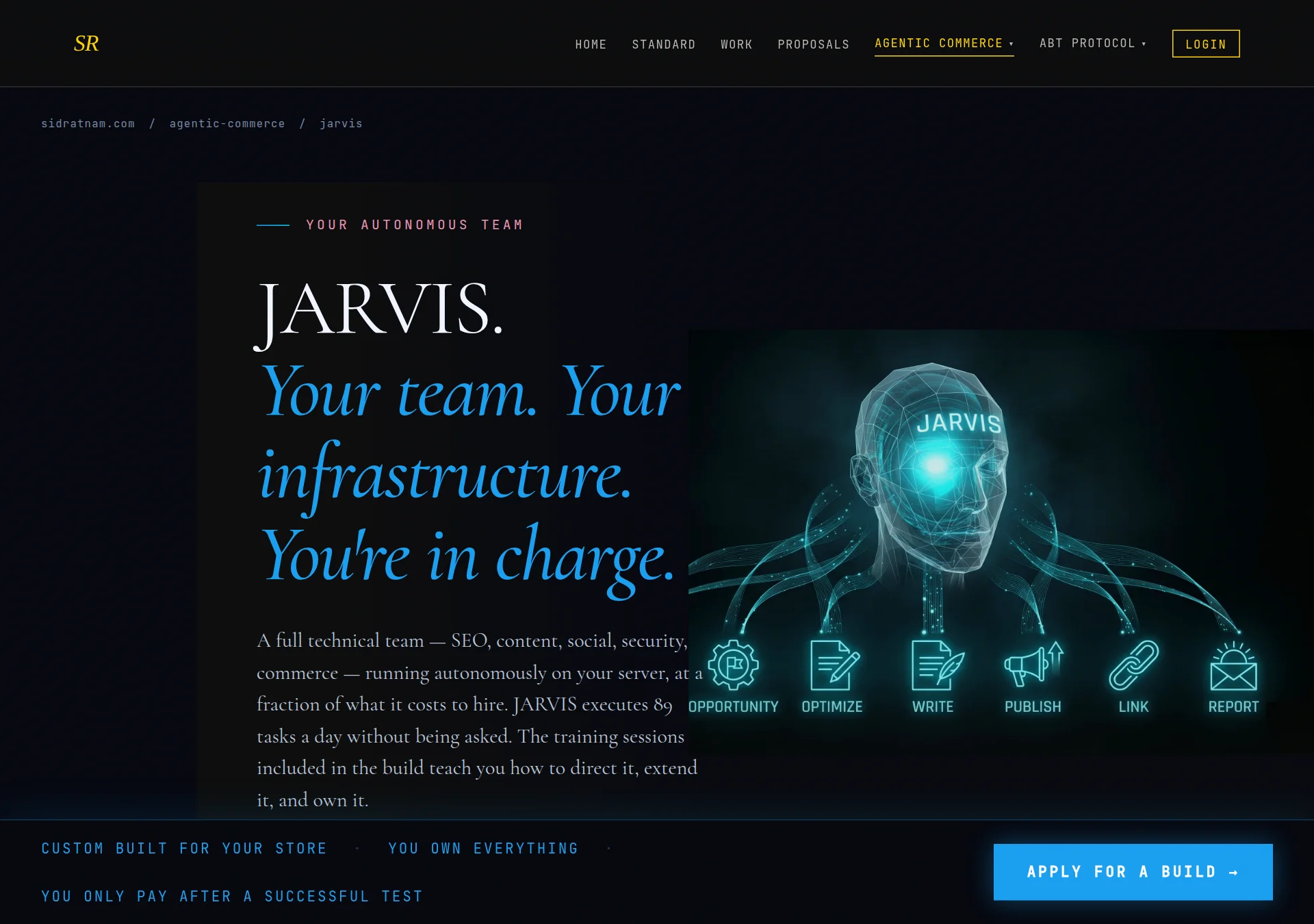
JARVIS is a separate AI system that runs the merchant's promotion, content, and back-office operations autonomously — every day, without a human doing those jobs. Foundation makes the store transactable by agents. JARVIS makes it grow. They are different technologies. Raise JARVIS at the right moment, with the right framing, and let the team close it.
What JARVIS Does — All 12 Systems
The simplest way to explain JARVIS to a merchant: "Everything you would hire a team of people or pay a bundle of agencies to do — JARVIS does it autonomously, on your server, every day."
JARVIS is two layers: four commerce agents that handle the transactional lifecycle, and eight backbone systems that run marketing, content, SEO, social, security, and infrastructure. All 12 systems operate from a single orchestrator. All 89 daily tasks execute before 7:30 AM.
Commerce Agents — 01 through 04
These are covered in depth in Chapter 1. In the context of the JARVIS upsell, what matters is that Foundation installs only Agent 01. JARVIS Suite installs all four.
- 01 — Discovery Optimizer. Runs at 3 AM daily. Uses AI to review and optimise the store's ACP manifest — the structured description AI agents read when they discover the store. Keeps the store's catalog description accurate and competitive so AI agents choose it over competitors. Auto-rolls back if the output is malformed. This is the Foundation agent.
- 02 — Cart Recovery. When a cart is abandoned, this agent detects the exact abandonment signal, reads the cart contents, and sends a targeted recovery message via email or SMS. Different message logic for price hesitation vs. shipping confusion vs. product uncertainty. Not a generic blast — context-specific, per customer.
- 03 — Checkout Intelligence. Wraps every order with AI reasoning before it hits the POS. Checks availability, suggests substitutions for out-of-stock items, identifies upsell opportunities. If the AI call fails, the order passes through unchanged — never a blocker.
- 04 — Post-Purchase. After every order: confirmation, tracking update, feedback request, reorder nudge at the right interval. Personalised in the merchant's brand voice. Zero manual touch per order. Sequences run on Day 1, Day 7, and Day 30.
The Autonomous Backbone — 05 through 12
These eight systems run every night, completing 89 tasks across SEO, content, social, security, and infrastructure — all before the morning report hits the merchant's inbox at 7:30 AM.
- 05 — SEO Automation. 89 daily tasks covering: rank tracking (keyword positions monitored and logged), Google Search Console sync (impressions, clicks, coverage errors pulled daily), broken link detection and queuing for repair, sitemap refresh and regeneration, automatic submission to Google Indexing API and Bing Webmaster, orphan page detection (pages with no internal links, surfaced for content team). This is an SEO agency's full monthly workflow, running every single day.
- 06 — Blog + Content. AI writes and publishes one new SEO-targeted article every day, driven by the strategy meeting's content plan. Each article is keyword-targeted based on GSC opportunity data, written in the merchant's brand voice, schema-marked for rich results, and published directly to the site — no human in the loop. Cost: approximately $0.001 per article in Claude API inference. A content agency charges $150–$500 per article for the same output.
- 07 — Daily Strategy Meeting. Five AI department heads — SEO, Content, Growth, Social, and Infrastructure — convene at 4 AM every day. Each head reviews overnight data from their domain (rankings, traffic, social performance, security flags, infrastructure status) and contributes to a unified execution plan for the day. The plan is what drives the content article topic, the social post content, the SEO priorities. JARVIS is not executing blindly — it is executing from a daily strategy informed by real data.
- 08 — Social Automation. Posts generated from the strategy meeting's content plan and published daily across all configured social profiles via Zernio (unlimited posts, 50 profiles). Content is tailored to the platform and drawn from the merchant's own articles, products, and promotions. No copywriter. No social media manager. No logging in to schedule. The merchant's social presence runs without them. On the three live sites this runs on: 15+ posts go out daily across Twitter/X, LinkedIn, and BlueSky. Zernio cost: $49/month for all three sites combined.
- 09 — Security Monitoring. Daily CVE scan against the merchant's server stack and installed dependencies. Dependency audits flag packages with known vulnerabilities. Alerting surfaces issues in the morning report. Actionable issues are queued for the Self-Healing Loop. The merchant does not need to think about this — JARVIS watches the attack surface every night and brings findings to them each morning.
- 10 — Nightly Backup. Full system backup every night to the configured destination — Cloudflare R2, AWS S3, or another target confirmed during the install session. Encrypted. Timestamped. Permanently logged. The backup destination is verified on install day and runs silently from that point. Zero manual scheduling ever. The merchant has a complete recovery point every morning before they start the day.
- 11 — Self-Healing Loop. Runs after the 5 AM audit phase. Issues detected during the overnight audit — broken links, failed tasks, config drift, minor errors — are diagnosed and resolved automatically before the morning report is written. The goal: the morning report should document what JARVIS fixed, not what the merchant needs to fix. Broken links get queued and resolved. Failed tasks are retried. Config drift is identified and flagged or corrected. The merchant wakes up to a fixed system, not a list of problems.
- 12 — Morning Report. Every day at 7:30 AM, a complete briefing lands in the merchant's inbox: what ran overnight, what was fixed by the self-healing loop, which keywords are trending up or down, what tomorrow's content plan is, what today's strategy priority is. Everything executed, audited, and reviewed before it reaches the merchant. The merchant's day starts with full situational awareness — not with logging into six dashboards to figure out what happened.
JARVIS runs across three live production sites (sidratnam.com, cinematiccard.com, tradeexecutor.ai). Total AI inference cost: approximately $0.30/day for the daily strategy meeting, research, and reporting engine. Per article published: ~$0.001. Social scheduling via Zernio: $49/month for unlimited posts across all three sites combined (50 profiles). Security scanning, backups, self-healing, indexing submissions: near-zero API cost. The merchant's total ongoing out-of-pocket is their VPS hosting and their API keys. The system is theirs. It runs on their infrastructure. It does not disappear when they stop paying a vendor.
For context: a full-service SEO agency for one site runs $3,000–$8,000/month. A content writer producing daily articles runs $4,500–$9,000/month. A social media manager across three platforms runs $2,500–$5,000/month. An IT/security monitoring service runs $1,500–$4,000/month. The equivalent human and agency cost across three sites: $16,500–$40,000 per month. JARVIS runs the same work for approximately $58/month in third-party costs.
The result: the merchant has a functioning marketing team, an SEO operation, a content pipeline, a social presence, and a self-healing infrastructure — running permanently on their own server, at a fraction of the cost of hiring anyone to do it.
The 7-Phase Daily Pipeline
JARVIS does not run tasks randomly. It runs a structured 7-phase pipeline every night, in sequence, before 7:30 AM. Each phase depends on the previous one. This is important to know when a merchant asks how it works — or when something goes wrong and you need to diagnose where in the pipeline a failure occurred.
The pipeline is designed to catch its own failures. Phase 5 audits Phase 4. Phase 6 fixes what Phase 5 found. Only issues that cannot be resolved autonomously surface in the morning report as action items. For issues outside JARVIS's scope — a domain going down, a payment processor outage — the morning report flags it for the merchant to handle. JARVIS does not try to fix things it cannot fix. It surfaces them clearly instead.
What JARVIS Does Not Do
JARVIS generates content and executes SEO and social tasks — but it must be directed. The training sessions included in the JARVIS Suite teach the merchant how to configure JARVIS for their specific brand, tone, and priorities. After graduation, the merchant is their own support. JARVIS is autonomous, but it needs to be pointed in the right direction first. That is what the three training sessions are for.
JARVIS does not:
- Run paid advertising (Google Ads, Meta Ads) — it handles organic only
- Replace the merchant's own brand judgment — JARVIS executes within a brief the merchant sets; it does not decide their positioning or messaging
- Manage the agentic commerce agents (Foundation) directly — those are separate systems
- Work without Google Search Console access being provided at setup
- Operate without an initial configuration session — the day 1 training is what activates it for their specific business
When to Raise JARVIS
Don't lead with JARVIS. It's the JARVIS Suite — it belongs in a conversation that's already going well. The natural moments:
- On the install Zoom, after the live test: Merchant asks "what else does it do?" — this is your moment. "The Foundation you just saw is one agent. The JARVIS Suite adds three more agents and JARVIS — which improves your Google ranking automatically every day."
- Pre-install, if the merchant mentions SEO struggles: "The JARVIS Suite includes something called JARVIS that runs daily technical SEO improvements — it's not an agency, it's a system that reads your Google Search Console data and acts on it automatically."
- Post-install, if the merchant is happy with what they saw: Follow up with the JARVIS framing when you check in on the 72-hour payment window.
Don't raise JARVIS in a cold conversation before the merchant has engaged with the Foundation concept. It adds complexity before they've bought the premise.
The 60-Second JARVIS Explanation
The $15K Delta
JARVIS Suite is $15,000 more than Foundation. What the merchant gets for that delta:
- Three additional agents (Cart Recovery, Checkout Intelligence, Post-Purchase)
- JARVIS — 89 daily tasks: blog publishing, social posting, Google SEO monitoring, internal linking, daily strategy report, self-healing infrastructure
- Three live training sessions (install, day 30, day 60 graduation) — including how to direct JARVIS for their specific brand and priorities
- 60-day delivery vs 30-day (more complex build)
- 90-day support window vs 30-day
- Full codebase ownership with graduation — the merchant self-supports after day 60
The comparison frame that works: "Most merchants piece together five or six SaaS tools to get a fraction of this — an SEO tool, a social scheduler, a content agency, a monitoring service — and they pay monthly, forever, and they still have to manage all of it. This is a one-time cost. The system runs permanently on their server. We run this across three of our own sites. The AI inference cost is about thirty cents a day."
Handling "Let Me Think About It"
When a merchant wants to consider upgrading to JARVIS Suite, give them space but don't disappear. The right follow-up rhythm:
- 24 hours after the install call: Check in on how they found the experience. Ask if they have questions about the JARVIS Suite — don't push, just open the door.
- 72 hours (when the payment window closes): If they've paid the Foundation invoice, this is the right moment to follow up on JARVIS Suite — they've committed, the system is live, they're in the mindset.
- 7 days post-install: Final follow-up if they haven't engaged. Keep it short: "Just checking in on the agentic system — it's been running for a week. Wanted to see if JARVIS is something worth a conversation."
Don't use urgency framing ("this won't be available much longer"), don't repeat the pitch verbatim, don't stack multiple follow-up messages. One follow-up per timing point, maximum. If they've said no twice, they mean no — move on and bring in a better-fit merchant.
Escalating a JARVIS Request
When a merchant is ready to explore JARVIS Suite, your job is to collect the right information and escalate it cleanly. Don't try to close it yourself — JARVIS is part of a $20,000 engagement and the deployment team makes the final call on fit.
Information to collect before flagging:
- Merchant's current Foundation engagement status (are they paid and live, or still in the 72-hour window?)
- Whether they have Google Search Console set up and verified for their domain
- What specifically attracted them to JARVIS Suite — which agent, JARVIS, or both
- Their current SEO situation — do they have any SEO work happening? An agency? Nothing?
- Their timeline expectations — do they want this now, or are they planning ahead?
How to escalate: Email or message the deployment team with the merchant's name, their Foundation engagement ID (visible in their application confirmation), and the answers to the above. Keep it factual — no pressure framing, no urgency you've invented. The team will reach out to the merchant directly to explore fit.
Flag JARVIS upgrade leads to Sid at: [email protected]
Include the merchant name, their domain, their Foundation engagement status, and a one-paragraph summary of the conversation. Sid reviews these and follows up directly.
After escalating, stay in light contact with the merchant to maintain the relationship — but don't position yourself between them and the deployment team. The upgrade conversation belongs to the technical team.
Operator Training Document · sidratnam.com · Confidential · Do not distribute
The seal signals it's real, honest, and right.